Self-Host Ghost CMS in One Click (2026)
A practical guide to running your own Ghost publication: how it compares with Ghost(Pro) and WordPress, what Ghost officially needs, a one-click deploy, SMTP and Mailgun, custom domain with free SSL, members, themes and backups.
TheCodexApps Team
Ghost is built around how independent writers work in 2026: a clean editor, a fast site, and members and newsletters in the core rather than in plugins. You can pay the Ghost Foundation to host it, or run it yourself. This guide covers the second option, done sensibly: a one-click deploy on TheCodexApps, real email delivery, your own domain with free HTTPS, and a backup routine you will actually follow.
Self-hosting Ghost is not hard, but two things are easy to underestimate: memory and email. Ghost's documentation asks for at least 1 GB of memory, and newsletters need a dedicated bulk email provider. Neither is a blocker; both are worth knowing before you deploy.
- Pick a 1 GB+ package
- Deploy Ghost from the catalog
- Set url and SMTP
- Attach your domain
- Publish and grow members
What Ghost is good at, and where it stops
Ghost is an open-source publishing platform written in Node.js. It stores content in MySQL, renders themes written in Handlebars, and ships with a card-based editor that supports Markdown, embeds, galleries, bookmarks and email-only content. Its defining feature is that audience tools live in the core: readers can sign up as free members, upgrade to paid tiers through Stripe, and receive posts as newsletters straight from the editor.
That focus is also its boundary. Ghost is not a general website builder, and there is no plugin marketplace that turns it into a shop or a forum. For a publication — essays, tutorials, a company blog, a paid newsletter — it is a sharp tool. If you need many unrelated features on one site, WordPress is usually the better fit; see our guide on deploying WordPress with free SSL.
Ghost vs Ghost(Pro) vs WordPress
Most people deciding to self-host Ghost are really choosing between three options. Here is how they compare for a publication.
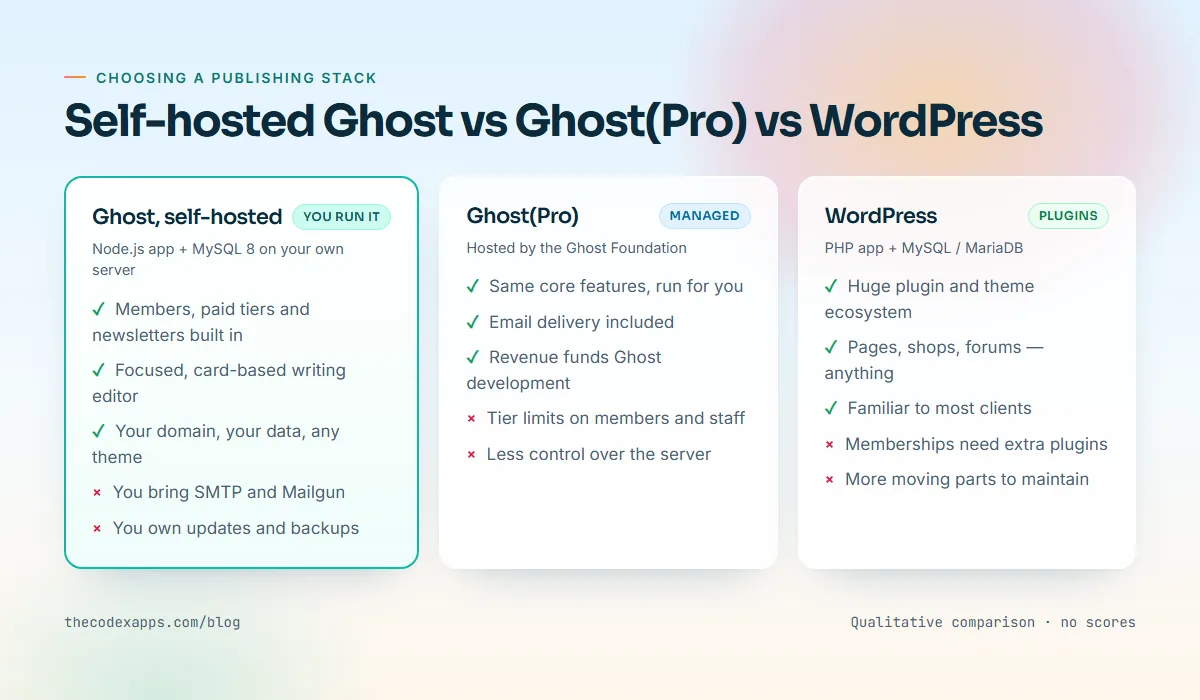
| Self-hosted Ghost | Ghost(Pro) | WordPress | |
|---|---|---|---|
| Who runs the server | You (or your host) | The Ghost Foundation | You (or your host) |
| Memberships and paid tiers | Built in, via Stripe | Built in, via Stripe | Plugins |
| Newsletters | Built in, needs your own Mailgun | Built in, delivery included | Plugins or external service |
| Writing experience | Focused card editor | Same editor | Block editor, very flexible |
| Extensibility | Themes, integrations, APIs | Themes, integrations, APIs | Tens of thousands of plugins |
| Email for sign-ins | Your SMTP provider | Included | Your SMTP provider or plugin |
| Pricing model | Your hosting plus email provider | Subscription tiers by audience size | Your hosting plus plugins |
Ghost(Pro) is the managed service run by the Ghost Foundation, the non-profit behind Ghost. You get the same software with hosting, updates and email delivery handled for you, and your subscription funds Ghost's development. Plans are tiered by audience size and features; check the current tiers on the official Ghost pricing page rather than relying on numbers in a blog post. If you never want to think about servers or email deliverability, Ghost(Pro) is a genuinely good choice.
Self-hosted Ghost gives you the same software on infrastructure you control: any theme, any integration, the Admin and Content APIs, and costs tied to your hosting and email providers rather than member counts. You configure email and own updates and backups. On a managed platform like TheCodexApps, the operating system, Docker, the reverse proxy and certificates are handled for you, so "self-hosting" mostly means owning Ghost's own configuration. WordPress wins on breadth; for a pure publication with members, Ghost needs fewer moving parts.
What Ghost officially needs
Ghost publishes clear self-hosting requirements in its hosting documentation (checked 21 November 2026). For a production install, Ghost lists:
- Ubuntu 22.04, 24.04 or 26.04 (LTS) for its own CLI-based install,
- Node.js 22 or 24 (LTS),
- MySQL 8.0 or 8.4,
- a server with at least 1 GB of memory,
- NGINX and systemd in the classic setup.
On TheCodexApps you do not install Ubuntu, Node.js, NGINX or systemd — the template runs Ghost and MySQL as containers behind the platform's TLS proxy. What you cannot skip is the memory budget: Ghost and MySQL 8 run side by side. That is why the Ghost template's minimum plan is App Starter (1 vCPU, 1 GB RAM).
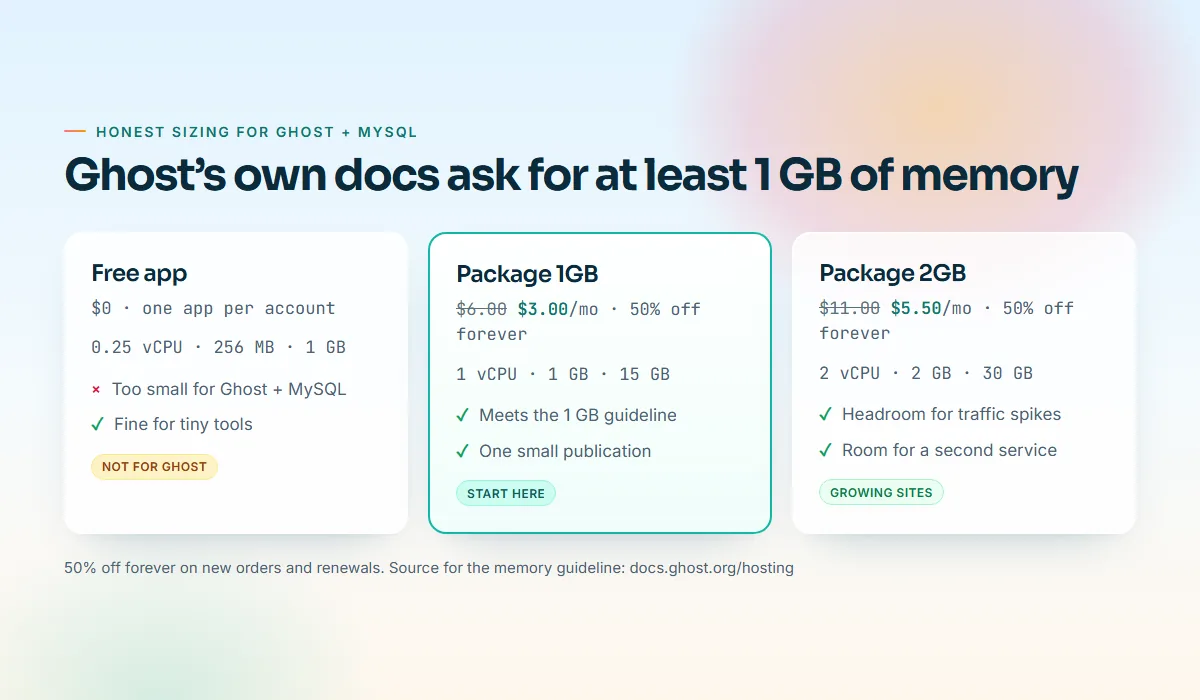
The free app (0.25 vCPU, 256 MB RAM, 1 GB disk, one per account) is useful for trying the panel with small tools, but Ghost with MySQL will not run reliably in 256 MB. For more on sizing, read choosing the right resource package.
Before you start: a short checklist
Gather these before you deploy:
- A domain name with access to its DNS settings — Ghost's install guide lists one as a prerequisite.
- An SMTP provider for transactional email: member sign-in links, staff invitations and password resets.
- A Mailgun account, only if you plan to send newsletters.
- A Stripe account, only if you want paid memberships.
- A TheCodexApps account with a verified email address.
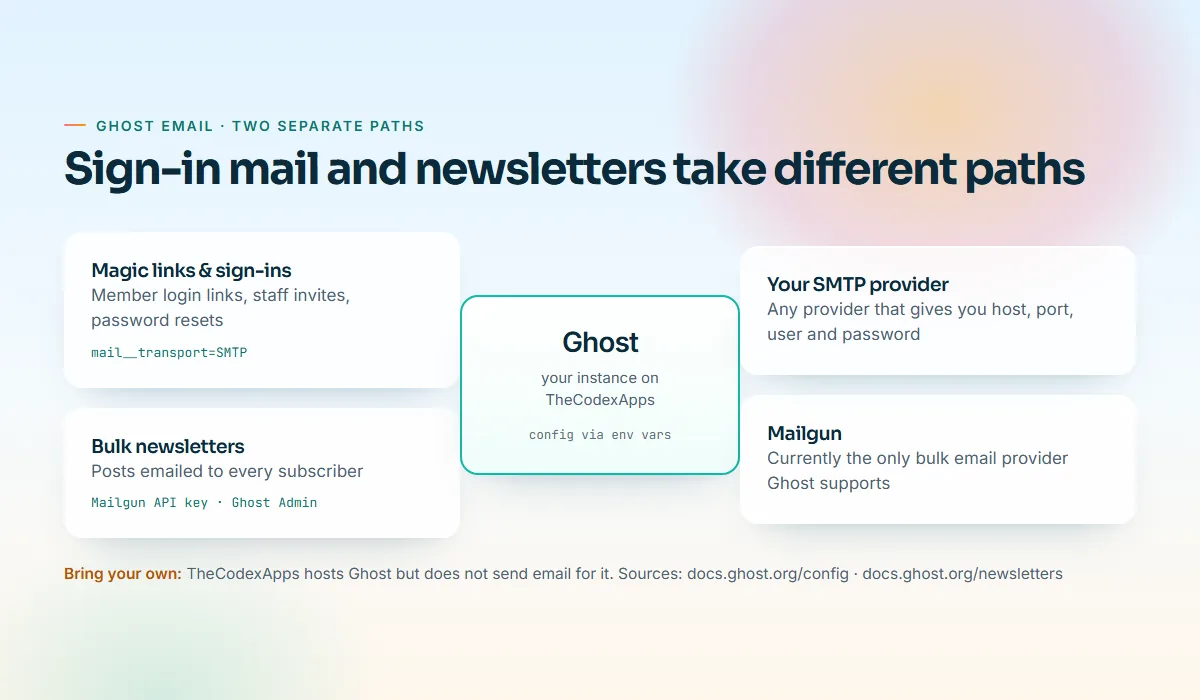
TheCodexApps hosts Ghost; it does not send email on Ghost's behalf. We will configure your own providers below.
Step 1: Pick a package with enough memory
Sign up at /signup, confirm your email address, and choose a plan from /pricing. For Ghost, start with one of these:
| Option | Resources | Regular price | First period with launch sale |
|---|---|---|---|
| App Starter (per-app plan) | 1 vCPU, 1 GB RAM | $6/month | $3 |
| Package 1GB | 1 vCPU, 1 GB RAM, 15 GB disk | $6/month or $60/year | $3/month or $30/year |
| Package 2GB | 2 vCPU, 2 GB RAM, 30 GB disk | $11/month or $110/year | $5.50/month or $55/year |
A package is a pool of resources that can hold as many services as fit. Yearly billing costs ten months' price. The launch sale takes 50% off the first billing period; renewals are at the regular price, and coupons stack on the sale price. Pay with crypto at checkout or from your wallet, and turn on auto-renew from the wallet. Choose Package 1GB for a new publication, Package 2GB if you already have an audience or want room for other services. Location today is USA.
Step 2: Deploy Ghost from the catalog
Open the Ghost page in the Apps catalog (or New order → One-click app in the panel), choose Ghost, select your package or plan and the USA location, and confirm. The platform provisions two containers — Ghost and MySQL — wires them together with generated credentials, assigns a free subdomain on us.thecodexapps.xyz, and issues a Let's Encrypt certificate for it automatically.
Provisioning usually takes a few minutes, and you get an email when the service is ready. The service page shows the HTTPS URL, logs, power controls and the Env vars tab.
Step 3: Create the owner account and check the url setting
Ghost's admin interface lives at /ghost on your site. Open https://<your-subdomain>/ghost/ and Ghost walks you through creating the site title and the owner account. Use a unique, long password: the owner account can change everything, including payment settings once Stripe is connected.
Next, look at one configuration value that trips up more Ghost installs than anything else: url. Ghost uses it to build every absolute link it generates — canonical URLs, sitemap entries, RSS links, image URLs and the links inside sign-in emails. It must exactly match the public HTTPS address of your site. The one-click template sets it to the generated subdomain, which is correct for now. When you attach a custom domain in Step 5, you will update it.
Open Env vars on the service and note which variables the template generated. Values are write-only — once saved they are never shown again — so keep a copy of anything you set yourself. Leave generated passwords and database settings alone: changing them can break the connection between Ghost and MySQL.
Step 4: Configure transactional email (SMTP)
Ghost's configuration documentation is direct about this: mail is required in production. Without it, members cannot receive sign-in links, staff invitations fail, and password resets go nowhere. Ghost uses Nodemailer under the hood and can be configured with any SMTP service.
Every Ghost configuration option can be overridden with an environment variable, and nested options are separated with two underscores — the documentation's own example is database__connection__host. Applying that documented convention to the mail block of Ghost's config gives the variables below. Check the template's generated variables first; if any mail keys already exist, replace their values rather than adding duplicates.
mail__transport=SMTP
mail__from="Your Publication <newsletter@example.com>"
mail__options__host=smtp.your-provider.example
mail__options__port=587
mail__options__secure=false
mail__options__auth__user=YOUR_SMTP_USERNAME
mail__options__auth__pass=YOUR_SMTP_PASSWORD
A few practical notes:
- Port and
securego together. Port 587 uses STARTTLS, sosecureisfalse; port 465 uses implicit TLS, sosecureistrue. A mismatch shows up in the logs as a TLS or greeting error. - The from address must be allowed by your provider. Most providers require you to verify the sending domain with SPF and DKIM records. Do that at your DNS provider before testing, or messages land in spam.
- Changes apply after a restart. For one-click apps, environment variable changes take effect when you restart the service from the panel.
- Ghost's docs warn that some hosts block outbound SMTP. If a test email never arrives, check the runtime logs for connection errors.
To test, sign up as a member on your own site.
Step 5: Attach your custom domain and SSL
Open the service → Domains → Add a custom domain, and enter the hostname you want, for example blog.example.com. The panel then shows the DNS records to create, as described in the custom domains docs:
- Point the domain at the service — a
CNAMEfromblog.example.comto your default subdomain, or anArecord to the server IP shown in the panel for a root domain likeexample.com. - Prove ownership — a
TXTrecord with the verification token shown in the panel.
Press Verify. DNS changes can take a few minutes to propagate. Once the check passes, the domain is attached and a free Let's Encrypt certificate is issued automatically. Let's Encrypt certificates are valid for 90 days, and renewal is automatic — you never run certbot. If you use Cloudflare, keep the record set to DNS only (grey cloud) at least until the certificate is issued. The platform re-checks verified domains every six hours and emails you if a domain stops pointing at your service.
You can confirm the DNS and HTTPS from your own terminal:
dig +short blog.example.com CNAME
my-ghost-a1b2c3.us.thecodexapps.xyz.
curl -sI https://blog.example.com | head -n 1
HTTP/2 200Now set Ghost's url to the new address — url=https://blog.example.com — and restart the service. Skip this and emails, canonical tags and the sitemap keep pointing at the old subdomain.
Step 6: Turn on newsletters with Mailgun
Ghost's newsletter documentation explains why SMTP is not enough here: delivering bulk email newsletters can't be done reliably with basic SMTP, and a bulk mail provider is required. At present, Mailgun is the only bulk email provider Ghost supports. Self-hosted installs configure it by entering Mailgun API keys in the email newsletter settings of Ghost Admin.
The setup in practice:
- Create a Mailgun account and add a sending domain such as
mg.example.com. Add the DNS records Mailgun gives you (SPF, DKIM and usually a tracking CNAME) at your DNS provider. - In Ghost Admin, open the email newsletter settings and fill in the Mailgun section: region, sending domain and private API key.
- Send a test newsletter to yourself before sending to subscribers.
Member sign-in and sign-up emails keep using your SMTP settings from Step 4; Mailgun only handles the bulk sends. Check Mailgun's current plans and limits on their site, because sending volume is where newsletter costs actually come from.
Step 7: Members, paid tiers and Stripe
Memberships work out of the box: readers sign up with an email address and Ghost sends a magic link to sign in — which is why Step 4 matters. In Ghost Admin's membership settings you choose who can sign up and which posts are public, members-only or paid.
For paid subscriptions, connect Stripe from the same settings area, then create tiers with monthly and yearly prices, offers and trials. Payments go from readers straight to your Stripe account. Enable two-factor authentication on both Ghost and Stripe.
Step 8: Upload a theme and tune the basics
Ghost ships with a polished default theme; upload others as a zip file from the Design / theme settings in Ghost Admin, and keep edited themes in Git. Worth reviewing on day one:
- Site title, description and social cards — your default meta tags and sharing images.
- Navigation — keep it short; tag and author archives are automatic.
- Staff users — invite editors with the least privileged role they need.
- Integrations — the Content and Admin APIs let you publish from scripts or other tools.
Backups, updates and day-two operations
On TheCodexApps, one-click apps keep their data in volumes on the server. The daily managed backups described in the backups docs apply to managed databases; for a one-click Ghost app, keep your own copies of anything important. For Ghost, that means:
- Export your content regularly using Ghost's built-in export in Ghost Admin settings, which produces a JSON file of your posts, pages, tags and settings.
- Export your members as a CSV from the members area, especially before major changes.
- Keep your theme in Git and keep originals of important images, since uploaded media lives in Ghost's content folder rather than in the JSON export.
- Store copies off the server — a private repository, an object storage bucket or your laptop's backup.
For updates, read Ghost's release notes before major versions, export first, and redeploy during a quiet window; check the runtime logs afterwards.
Common problems and quick fixes
| Symptom | Likely cause | Fix |
|---|---|---|
| Service restarts or gets killed under load | Not enough memory for Ghost plus MySQL | Move to Package 1GB or larger; Ghost asks for at least 1 GB |
| Members never receive sign-in links | Mail not configured, wrong port/secure pair, unverified sender | Set the mail__ variables, restart, check logs and SPF/DKIM |
| Emails link to the old subdomain | url still set to the generated address |
Set url to your HTTPS custom domain and restart |
| Custom domain stuck on verifying | DNS not propagated, or proxied through Cloudflare | Wait a few minutes, check records, use DNS only until the certificate is issued |
| Newsletter option unavailable | Mailgun not configured | Add region, domain and API key in the newsletter settings |
| Database errors after editing env vars | A generated credential was changed | Restore the original value; leave generated passwords alone |
Key takeaways
- Self-hosted Ghost gives you the full publishing stack — editor, members, paid tiers, newsletters — on infrastructure you control, with costs tied to your hosting and email providers.
- Ghost's documentation asks for at least 1 GB of memory and MySQL 8. Start at Package 1GB or App Starter; the 256 MB free app is not enough for Ghost.
- Mail is required in production. Configure SMTP through Ghost's double-underscore environment variables, and use Mailgun for newsletters. TheCodexApps does not send email for you.
- Attach your domain, let Let's Encrypt handle HTTPS automatically, then update
urland restart. - Export content and members regularly and keep copies off the server.
Frequently asked questions
Can I run Ghost on the TheCodexApps free tier?
We do not recommend it. The free app has 256 MB of RAM, while Ghost's own hosting documentation asks for a server with at least 1 GB of memory, and the template runs MySQL alongside Ghost. Use the free app to explore the panel with a tiny tool, and run Ghost on Package 1GB, App Starter or larger.
Does TheCodexApps send Ghost's emails?
No. We host Ghost and its database, but email delivery is up to you. Configure an SMTP provider for transactional email such as sign-in links and invitations, and a Mailgun account if you want to send newsletters. Both are configured in Ghost, not in the hosting panel.
Why do newsletters need Mailgun if SMTP already works?
Ghost's documentation states that bulk newsletters can't be delivered reliably with basic SMTP and that Mailgun is currently the only supported bulk email provider. SMTP still handles one-to-one messages like magic links; Mailgun handles sends to your whole list.
How do I move my Ghost site to my own domain?
Add the domain under the service's Domains tab, create the CNAME or A record plus the TXT verification record shown in the panel, and press Verify. A free Let's Encrypt certificate is issued automatically. Then set Ghost's url variable to the new HTTPS address and restart the service.
Is self-hosted Ghost cheaper than Ghost(Pro)?
It depends on your audience size and how you value your time. Self-hosting costs your hosting plan plus your email providers, and you handle configuration and backups. Ghost(Pro) bundles hosting, updates and email delivery into tiers priced by audience size. Compare current tiers on the official Ghost pricing page against your expected list size.
How do I back up a one-click Ghost app?
Use Ghost's built-in export regularly for content and settings, export members as CSV, keep your theme in Git and keep originals of important media. One-click apps store data in volumes on the server, so store these copies somewhere else.
Start your Ghost publication
If you want a publication you fully control without patching a server, deploy Ghost from the catalog on Package 1GB — $3 for the first month during the launch sale, or $30 for the first year. Bring your SMTP and Mailgun details, attach your domain, and you can publish your first post the same afternoon. Still comparing platforms? Our roundup of Heroku alternatives for indie developers covers the wider hosting landscape, and the pricing page lists every plan.