Best Heroku Alternatives for Indie Devs (2026)
An honest look at Railway, Render, Fly.io, self-hosted Coolify on a VPS and managed Coolify-style hosting — what you operate, what you pay, how idle apps behave, and who should pick which.
TheCodexApps Team
Heroku taught a generation of developers that deploying could be as simple as git push, and plenty of teams still run on it. But if you are an indie developer with a side project, a small SaaS or a handful of client sites, the question in 2026 is no longer "can I deploy easily?" — every serious platform does that. The question is what you want to operate yourself, how you want to be billed, and what happens to your app when nobody is using it at 3 a.m.
This guide compares the options indie developers actually shortlist: Heroku itself, Railway, Render, Fly.io, a self-hosted Coolify panel on your own VPS, and managed Coolify-style hosting like TheCodexApps (that's us — we will be upfront about where we fit and where we don't). There are no made-up benchmark scores or "winner" badges here — each option is good for someone.
How to compare Heroku alternatives honestly
Feature checklists make every platform look identical: Git deploys, HTTPS, environment variables, logs, databases. Those are table stakes. For a solo developer or a small team, the differences that matter show up in a few places.
What you operate vs. what you pay for
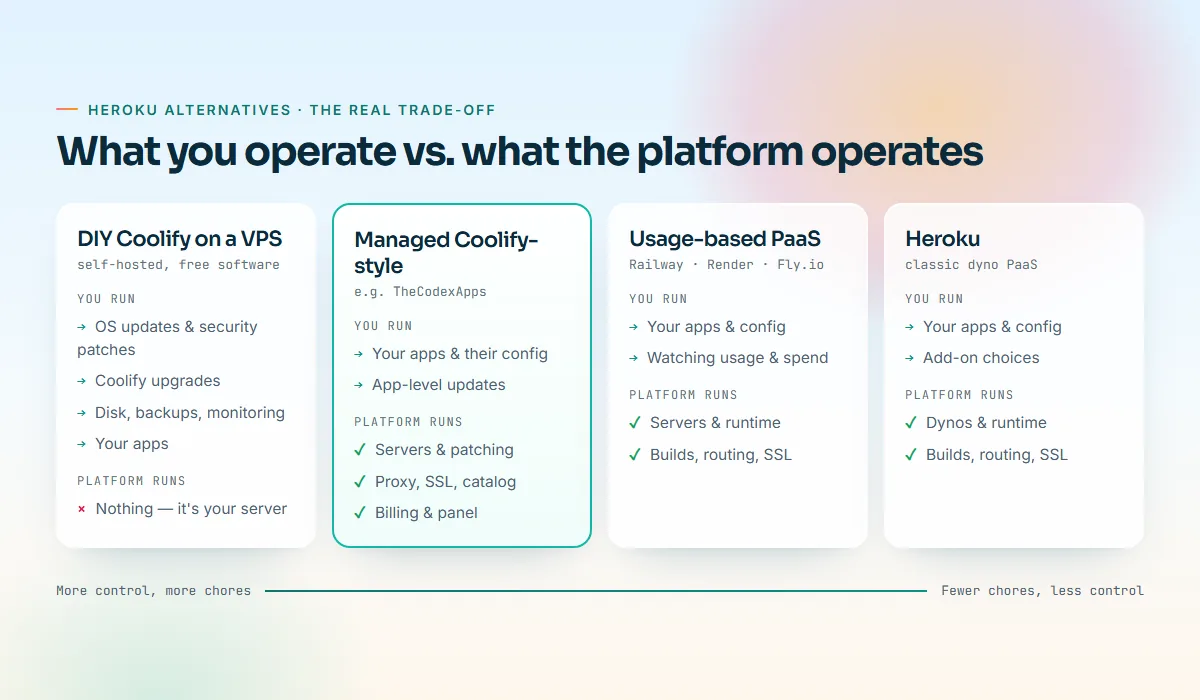
Every hosting choice sits somewhere between "I run the server" and "the platform runs everything except my code." Moving toward the platform removes chores — OS patches, reverse proxies, certificate renewals, disk alerts — and some raw control. Neither end is wrong; it depends on how you like to spend your Sunday mornings.
The pricing model, not just the price
A $5 headline can mean a fixed price per running process, a plan fee plus per-second usage, or a fixed pool of resources you split across many apps. For indie projects, predictability often matters more than the lowest number: a surprise bill on a hobby project hurts more than a slightly higher, flat one.
Idle behaviour, data and extras
Cheap tiers often stop apps that receive no traffic — fine for a demo, painful for a webhook receiver or a bot. Your data is the hard part of any move, so look at backups and restores (our post on managed Postgres vs self-hosting goes deep on this). Finally, weigh the extras you would otherwise build: pull request previews, one-click apps, automatic SSL, an API or MCP server, and billing methods that suit you.
The shortlist at a glance
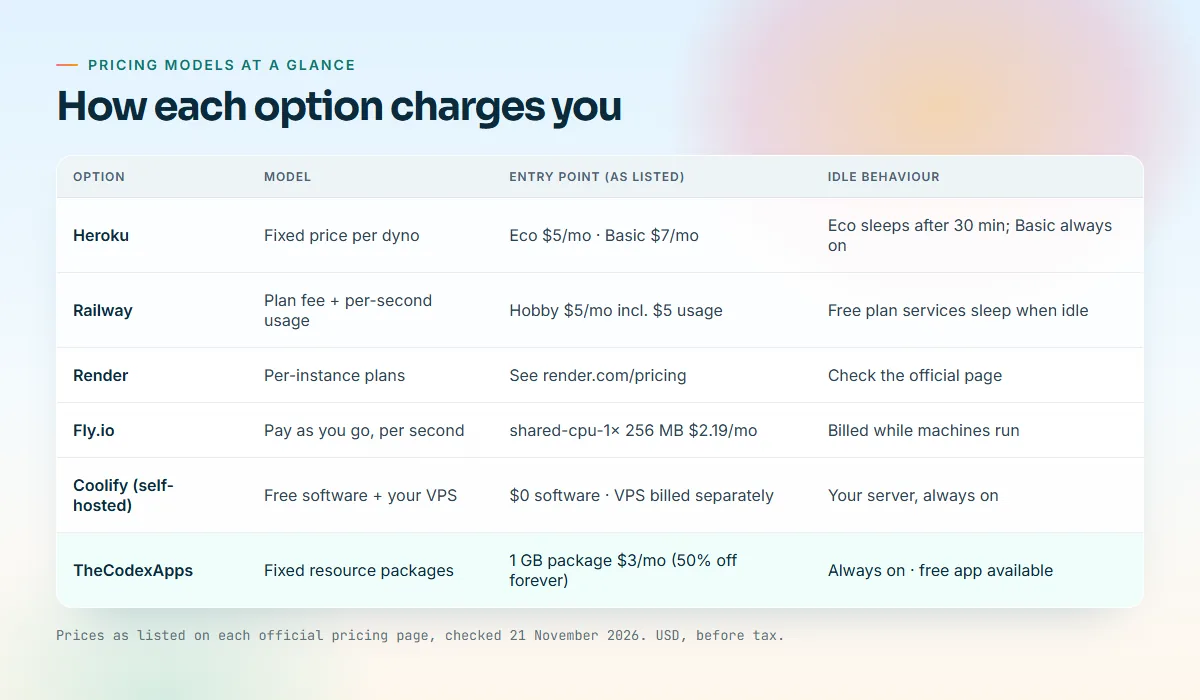
Prices below are as listed on each official pricing page, checked 21 November 2026, in USD. Pricing pages change often, so click through before you decide.
| Option | Pricing model | Entry point (as listed) | Idle behaviour |
|---|---|---|---|
| Heroku | Fixed price per dyno | Eco $5/mo, Basic $7/mo | Eco sleeps after 30 minutes of inactivity; Basic is always on |
| Railway | Plan fee plus per-second usage | Hobby $5/mo including $5 of usage | Free plan services sleep when idle |
| Render | Per-instance plans | See the official page | See the official page |
| Fly.io | Pay as you go, per second | shared-cpu-1x with 256 MB at $2.19/mo while running | Billed while machines run |
| Coolify (self-hosted) | Free software on your own VPS | $0 for the software; the VPS is billed separately | Your server, always on |
| TheCodexApps | Fixed resource packages | Package 1GB $6/mo ($3 first period on the launch sale) | Always on; a free app is available |
Heroku in 2026: still the reference point
It is worth being fair to Heroku before replacing it. The developer experience that made it famous is intact: buildpacks, a big add-on marketplace, review apps, pipelines and a mature CLI. As listed on heroku.com/pricing, checked 21 November 2026, Eco dynos cost $5 per month and sleep after 30 minutes of inactivity, Basic dynos cost $7 per month and are always on, and Standard-1X and Standard-2X dynos cost $25 and $50 per month.
The catch for indie developers is that the bill grows per process: a web dyno, a worker and a database add-on are three line items, and a staging copy doubles them. If that does not bother you, you do not need to move.
Railway: usage-based and pleasant to use
Railway's pitch is that you pay for what your services actually consume. As listed on railway.com/pricing, checked 21 November 2026, there is a Free Trial with a $5 one-time credit for 30 days, a Free plan at $0 with $1 per month of usage credit, a Hobby plan at $5 per month that includes $5 of usage, and a Pro plan at $20 per workspace per month that includes $20 of usage. Beyond the included credit, Railway charges per second for CPU, memory and disk, plus egress. The pricing page states that services on the Free plan are serverless and sleep after a few minutes without outbound traffic, waking on the next request.
Where it shines: bursty projects, prototypes and apps whose usage genuinely varies, with a polished dashboard and one-click databases.
What to watch: usage pricing is fair but harder to predict — a memory leak becomes a bigger bill rather than a crash. Set usage limits from day one.
Render: a managed PaaS with a familiar shape
Render offers web services, background workers, cron jobs, static sites and managed databases with Git-based deploys — for many people, "Heroku, modernized." Pricing is organized around per-instance plans per service type. We could not verify the current plan table when writing this, so we are not quoting numbers: check render.com/pricing for current instance prices, what the free tier includes, and whether free services spin down when idle.
Where it shines: teams that want a conventional managed platform with good defaults and preview environments.
What to watch: costs scale per service, so count every web service, worker, database and staging copy before comparing totals.
Fly.io: machines close to your users
Fly.io runs your app as lightweight virtual machines in many regions around the world. As listed on docs.fly.io/about/pricing, checked 21 November 2026, Fly bills for the resources you use with no monthly platform fee. New organizations do not get a free tier or monthly free allowance; there is a small trial credit, and a personal organization's bill under $5 for the month is waived. The smallest listed machine, a started shared-cpu-1x with 256 MB of RAM, is $2.19 per month, billed by the second while it runs.
Where it shines: latency-sensitive apps with users on several continents, for developers comfortable with a CLI-first workflow.
What to watch: multi-region adds moving parts — data replication and region-pinned volumes. If your users are mostly in one country, that complexity may buy you little.
Self-hosted Coolify on a VPS: maximum control, all the chores
Coolify is an open-source, self-hostable panel for your own server: Git deploys, Docker Compose, databases, automatic HTTPS and a large one-click catalog. As listed on coolify.io/pricing, checked 21 November 2026, self-hosted Coolify is free forever, and Coolify Cloud — where Coolify hosts the panel and you connect your own servers — starts at $5 per month for two servers plus $3 per additional server. The self-hosting docs recommend at least 2 CPU cores, 2 GB of RAM and 10 GB of free disk for Coolify itself, before your apps.
Where it shines: developers who want to own the stack and pick their own provider and region.
What to watch: you are now the operations team — OS security updates, Coolify upgrades, disk alerts, test-restored backups, firewall rules. It is a great learning experience and a real time cost, and the panel itself uses memory your apps cannot.
Managed Coolify-style hosting: TheCodexApps
TheCodexApps sits between self-hosted Coolify and a classic PaaS. You get the Coolify-style experience — one-click apps, Git deploys, databases, automatic SSL — while we run and patch the servers, the proxy and the panel. You never SSH into a VPS to apply updates.
What you get:
- Resource packages instead of per-app bills. A pool of CPU, RAM and disk with unlimited services inside it. See choosing the right resource package.
- A one-click catalog of roughly 354 app pages at /apps, from WordPress and Ghost to Uptime Kuma. Some apps are deliberately not enabled — n8n's license restricts offering it as a hosted service, so it is not in our default catalog.
- GitHub deploys via the GitHub App (auto-deploy and pull request previews), a public repository or a deploy key, built with Nixpacks, a Dockerfile, Docker Compose or as a static site. See the docs and our GitHub deploy guide.
- Managed databases — PostgreSQL, MySQL, MariaDB, MongoDB, Redis and ClickHouse (/docs/databases).
- Custom domains with free SSL. Every service gets a
*.us.thecodexapps.xyzsubdomain with HTTPS; add your own domain and, after the DNS check, a Let's Encrypt certificate is issued and renewed automatically (/docs/custom-domains). - An MCP server so Claude, Cursor or VS Code can deploy and inspect services with scoped keys and spending caps — see our MCP guide and /docs/mcp.
- Crypto and wallet billing. Pay invoices with crypto or from your prepaid wallet, top up with crypto, and let renewals auto-pay from the wallet. Card payments are processed by Paddle.com, our Merchant of Record; there is no automatic card top-up.
- A deploy button for open-source READMEs, made at /deploy.
What we are not:
- Not multi-region. Every service runs in our USA location today. If you need apps on several continents, Fly.io is a better fit.
- Not usage-based. You pay for the package whether you use 10% or 90% of it — predictable, but a scale-to-zero platform may cost less for an app that is idle most of the month.
- Not an add-on marketplace. You get our catalog and managed databases, not hundreds of third-party add-ons.
Packages and the launch sale
| Package | vCPU | RAM | Disk | Regular monthly | First period (launch sale) | Yearly (regular) |
|---|---|---|---|---|---|---|
| Package 1GB | 1 | 1 GB | 15 GB | $6.00 | $3.00 | $60 |
| Package 2GB | 2 | 2 GB | 30 GB | $11.00 | $5.50 | $110 |
| Package 4GB | 3 | 4 GB | 60 GB | $20.00 | $10.00 | $200 |
| Package 8GB | 4 | 8 GB | 120 GB | $36.00 | $18.00 | $360 |
Yearly billing costs ten months' price, so two months are free, and the launch sale halves the first yearly period too ($30, $55, $100 and $180). Renewals are at the regular price, coupons stack on the sale price, and wallet top-ups are never discounted. Per-app plans (App Starter, App Pro, Database Small, Git App Basic) are on the pricing page.
The free app
Every account with a verified email can run one free one-click app with 0.25 vCPU, 256 MB of RAM and about 1 GB of disk, on a free subdomain. It never renews and is never suspended for billing, and you can upgrade it in place from the billing tab. It is meant for small tools, not heavier software. Custom domains, databases and GitHub deploys need a paid plan or package. WordPress with MySQL and Ghost generally need more memory than 256 MB; for those, start with Package 1GB or larger, as we explain in the WordPress guide and the Ghost guide.
Feature-by-feature comparison
Based on each provider's public documentation; "Yes" means built in, not free.
| Feature | Heroku | Railway | Render | Fly.io | Coolify on a VPS | TheCodexApps |
|---|---|---|---|---|---|---|
| Git push or GitHub deploys | Yes | Yes | Yes | Yes (CLI-first) | Yes | Yes |
| Automatic HTTPS on custom domains | Yes | Yes | Yes | Yes | Yes (you maintain it) | Yes, free Let's Encrypt |
| Managed databases | Via add-ons | Yes | Yes | Yes | Yes (you operate them) | Yes |
| Pull request previews | Review apps | Yes | Yes | Do it yourself | Yes | Yes, GitHub App |
| One-click app catalog | Buttons and add-ons | Templates | Blueprints | Do it yourself | Large catalog | Large catalog |
| You patch the server | No | No | No | No | Yes | No |
| Regions | Several | Several | Several | Many | Wherever your VPS is | USA only |
A closer look at the details that bite
Sleep, cold starts and always-on apps
Anything that must answer promptly — webhooks from Stripe or GitHub, chat bots, scheduled jobs — belongs on an always-on tier. On Heroku that means Basic or above rather than Eco; on Railway, a paid plan rather than the Free plan. On TheCodexApps, services keep running whether or not they get traffic; the limit is the resources, not activity.
Git deploys and build systems
Heroku uses buildpacks, Railway and Coolify use Nixpacks-style detection, and Fly.io leans on Dockerfiles. If your app has a Dockerfile, it will run almost anywhere. Wherever you go, listen on 0.0.0.0 and the port the platform expects, keep secrets in environment variables and log to stdout — those three habits make migrations painless.
- Push to GitHub
- Build with Nixpacks or Dockerfile
- Deploy on a free subdomain
- Add your domain with SSL
Databases, backups and certificates
Ask any platform how database backups, downloads and restores work. On TheCodexApps, plans with backups get a daily backup at 03:00 UTC with the last seven kept off-site, and PostgreSQL, MySQL, MariaDB and MongoDB support one-click restore; data in an app's own volume (such as uploads) is separate, so keep your own exports. Certificates are simpler: Let's Encrypt certificates are free and valid for 90 days, and every managed option renews them for you. On a self-hosted VPS, Coolify automates renewal, but if the proxy or DNS breaks, you are the one who notices.
Who should choose what
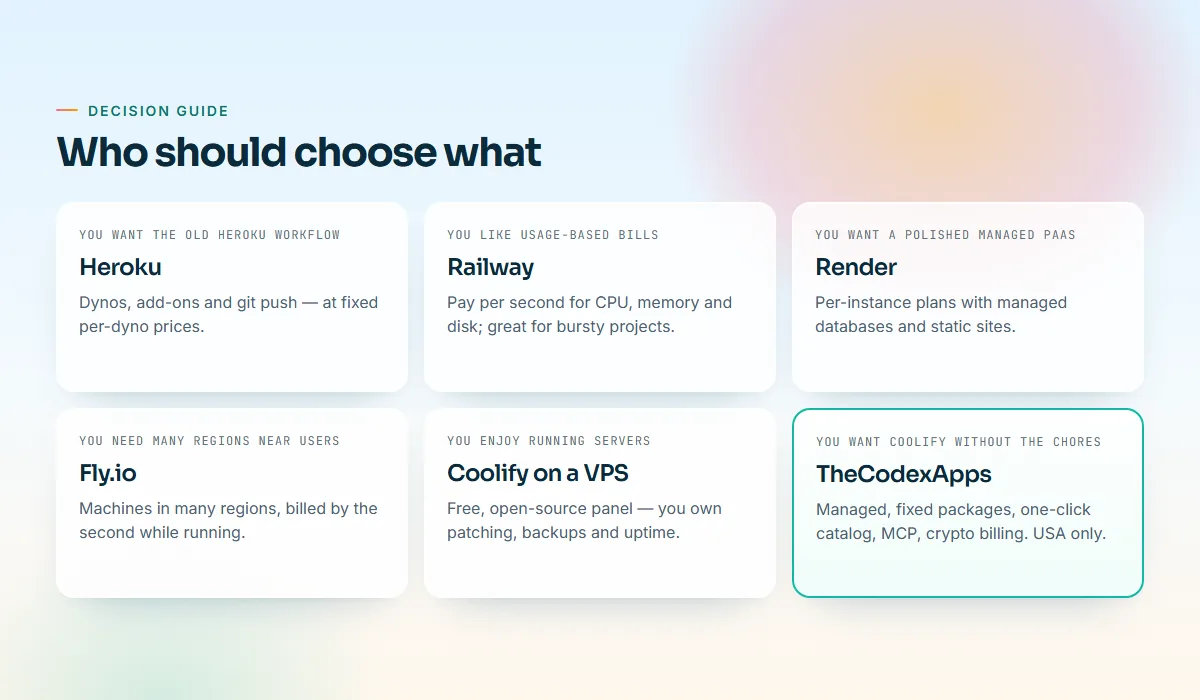
In short: stay on Heroku if you are productive there and the per-dyno bill is fine; Railway if your usage is bursty and you will set usage limits; Render for a conventional managed PaaS with per-service pricing; Fly.io if latency across continents is part of your product; self-hosted Coolify if you enjoy operations and want full control; and TheCodexApps if you want the Coolify-style catalog and Git deploys without running a server, a fixed pool for many small apps, crypto or wallet billing, or MCP for AI agents — and a USA location suits your users.
Migrating off Heroku without drama
- Inventory everything: dynos, add-ons, config vars, scheduled jobs and domains. Note which add-ons hold data.
- Make the app portable: read the port from the environment, bind to
0.0.0.0, move Heroku-specific settings into plain environment variables. - Move the database first: dump, restore into the new database and test against it.
- Deploy and test on the platform subdomain, then lower your DNS TTL, switch records and let the new platform issue a certificate.
- Keep the old app running read-only for a few days in case you need to roll back.
On TheCodexApps, step 4 means deploying on your free *.us.thecodexapps.xyz subdomain and then following /docs/custom-domains.
Key takeaways
- Decide first what you want to operate. Platforms differ less in features than in how many chores they take off your plate.
- Compare pricing models, not headline prices: per-process, usage-based and resource pools reward different kinds of projects.
- Check idle behaviour before you deploy anything event-driven. A sleeping app is a broken webhook.
- Your data is the hard part of any migration. Choose a platform whose backups and restores you understand.
- Self-hosted Coolify trades your time for control; managed Coolify-style hosting gives you the catalog without the server work, with a single USA location in our case.
Frequently asked questions
Is there still a free Heroku alternative for hobby projects?
Several platforms have some free option, but they differ in what "free" means. Railway's Free plan includes a small monthly usage credit and sleeps idle services; Fly.io has no free tier for new organizations but waives small personal bills under $5; self-hosted Coolify is free software but needs a server you pay for. TheCodexApps offers one free one-click app per verified account with 0.25 vCPU and 256 MB of RAM that never renews or expires. Check each official page for current details.
Which Heroku alternative is cheapest for several small apps?
For many small, always-on apps, a pooled resource model is usually most economical, because there is no fee per process. A TheCodexApps package lets you run unlimited services inside its CPU, RAM and disk pool, starting at $6 per month for 1 GB ($3 for the first period during the launch sale). A self-managed VPS with Coolify can be cheaper still if you value your time at zero.
Can I run WordPress or Ghost on a free tier?
Usually not comfortably. WordPress needs a database alongside PHP, and Ghost's official docs ask for a server with at least 1 GB of memory and MySQL 8. Our free app has 256 MB of RAM, which is fine for small tools but too tight for these. We recommend Package 1GB or larger; see our WordPress and Ghost guides.
Is TheCodexApps a drop-in replacement for Heroku?
Not exactly. Twelve-factor Heroku apps move easily, but we do not offer Heroku's add-on marketplace or multi-region deployment, and we run in a single USA location. If those matter, Fly.io or Render may fit better.
How do I pay, and can renewals happen automatically?
Invoices can be paid with crypto at checkout or from your TheCodexApps wallet, and you can top up the wallet with crypto. Card payments are processed by Paddle.com, our Merchant of Record. Renewals can auto-pay from your wallet balance; there is no automatic card top-up, so keep the wallet funded if you rely on auto-renew.
Try it without committing
If managed Coolify-style hosting sounds like your shape, the low-risk way to find out is to create an account, verify your email and deploy the free app from the catalog to see how the panel feels. When you are ready for a real project, Package 1GB is $3 for the first month during the launch sale, and you can compare every option on the pricing page. If another platform here fits you better, that is a fine outcome too.